Overview
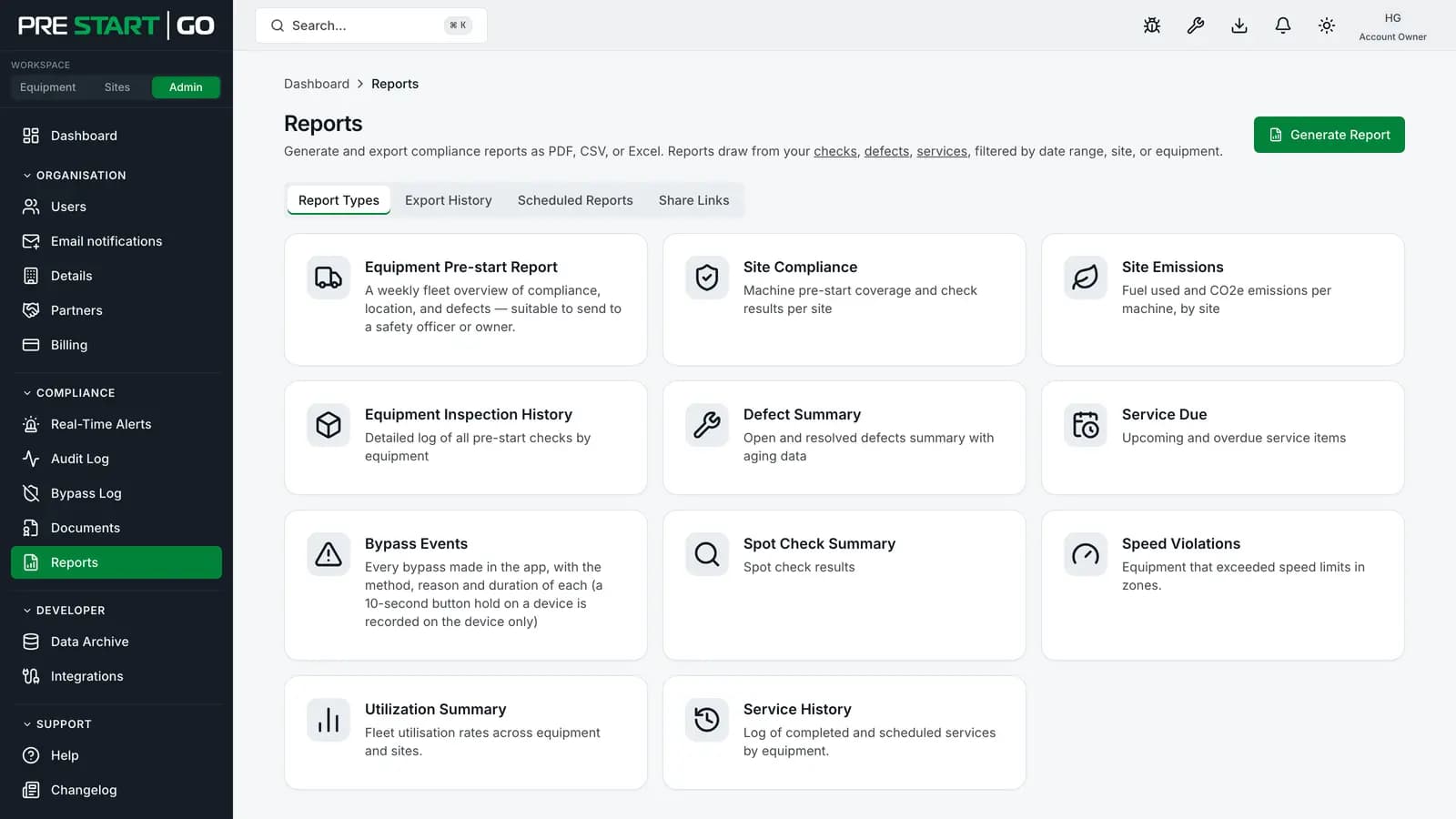
The Reports section turns the compliance record into audit-ready artifacts — generated, not compiled by hand. Eleven report types, three formats, on-demand or scheduled, with an event-triggered option for the reports that shouldn't wait for a schedule.
Before you start
- Plan
- Any
- Role
- Any role can generate a report and download it here; Contributor or above to email a copy to someone; Administrator or above for scheduled subscriptions
The eleven report types
| Report | What it answers |
|---|---|
| Equipment Pre-start | One row per machine: pre-starts done, compliance now, defects, bypasses, last known location and hire status over a period |
| Site Compliance | Inspection and audit status per site |
| Site Emissions | Emissions data rolled up per site |
| Equipment History | One machine's full inspection and event history |
| Defect Summary | Open and resolved defects across the fleet |
| Service Due | What's approaching or overdue for service — a point-in-time snapshot |
| Bypass Events | Emergency bypasses made in the app; a bypass with the Interlock's own button is never recorded |
| Spot-check Summary | Results from ad-hoc spot-check inspections |
| Speed Violations | Geofence and speed-limit breach events |
| Utilization Summary | Equipment usage and uptime rollups |
| Service History | Completed maintenance across a date range |
The three auditors ask for most — Equipment Pre-start, Site Compliance and Equipment History — draw directly from the pre-start corpus, which is why "audit prep" in PreStartGo is minutes of generation rather than days of collation.
The Equipment Pre-start Report is the one to send a safety officer or a machine's owner weekly: it is a whole fleet on one page, and it answers the question the others make you assemble — is every machine being checked, and what has gone wrong on it.
Generating and previewing
- 1
From Reports, pick a type — each has its own page with filters and a date range where applicable.
- 2
Check the preview — a live, capped view (up to 500 rows) to sanity-check filters before committing to a full export.
- 3Export in the format the audience needs.
| Format | Best for | Limits |
|---|---|---|
| CSV | Spreadsheets, further analysis | Up to the 50,000-row export cap |
| XLSX | The same, pre-formatted | Up to the 50,000-row export cap |
| Printing, sharing as a document | Formatted output, capped at 5,000 rows |
Completed exports land under Export History with a download link. If a report would exceed the export cap, narrow the date range and export in slices.
A report covers at most 400 days. Longer than that and the request is refused rather than silently truncated — split it into two.
Your organisation can have five reports generating at once. A sixth request is refused with a "try again shortly" message rather than queued; the five in front of it usually finish in seconds.
How long a report is kept
Generated reports are kept for 90 days from the moment they complete, then deleted along with the stored file. That window is shown in Export History. Two consequences worth planning around:
- A report you need to keep permanently should be downloaded and filed in your own records. Regenerating it later is usually possible, but only while the underlying records are still in range.
- A share link to a report expires at the earlier of the date you choose and the report's own 90-day window. A link cannot outlive the file it points at.
Background exports started from the Export button on a list page (equipment, licenses, sites, and so on) are a different thing and are kept for 30 days.
Scheduling recurring reports
Under Scheduled (Administrator and above), a subscription generates and emails a report automatically:
- Frequency — daily, weekly, monthly, quarterly, or yearly, at the day and time you set, evaluated in the subscription's own timezone. Delivery runs on a 15-minute cycle, so a report set for 07:00 goes out between 07:00 and 07:15 local, wherever the infrastructure runs.
- Recipients — up to 50 email addresses per subscription. They do not need PreStartGo accounts.
- Send now — an immediate one-off using the subscription's configuration, without disturbing the schedule.
Every scheduled email carries an unsubscribe link. A recipient who uses it stops receiving reports at that address from your organisation — across every subscription, not just the one they were sent. Your subscriptions still list the address, marked as opted out, so you can see why it went quiet.
Event-triggered delivery
A subscription set to On Demand fires on a platform event instead of a clock — currently, a critical defect being opened. The urgent report reaches the right inboxes the moment it matters rather than at the next scheduled run. Repeat events within 15 minutes are coalesced into one send, so a burst of defects does not become a burst of email.
Delivery health
Each subscription tracks its recent runs, and consecutive failures surface as a delivery-health warning in the console — a broken schedule announces itself rather than failing silently. After five consecutive failures the subscription is paused automatically and stops attempting delivery; fix the cause, then re-activate it. Re-activating a paused subscription schedules its next run from that moment: the runs it missed while paused aren't sent, so use Send now if a recipient needs one.
Edge cases
- Scheduled reports are a paid add-on — the Scheduled tab reflects whether your organisation carries it; on-demand generation is part of every plan.
- Hired-out machines appear in the owner's reporting throughout a hire — the compliance visibility that makes lending a machine tenable. The Equipment Pre-start Report is the one exception to owner-only reporting: the organisation a machine is hired to can also report on it, seeing only that machine and only the dates it was on hire to them.
- Timezones on quarterly/yearly schedules follow the subscription's timezone setting, same as weekly ones — set it once, correctly.
Troubleshooting
| Symptom | Likely cause | What to do |
|---|---|---|
| Export smaller than expected | The 50,000-row cap | Narrow the date range and export in slices |
| PDF missing rows the CSV has | PDF's 5,000-row cap | Use CSV/XLSX for the full data set |
| Scheduled report didn't arrive | Delivery failure, a spam filter, or the recipient unsubscribed | Check the subscription's delivery health and the recipient's opt-out state; have IT allow the sender |
| No Scheduled tab | Role below Administrator, or the add-on isn't active | Check both — the tab needs Administrator and the scheduled-reports add-on |
| Preview shows fewer rows than the export | Previews cap at 500 rows by design | The export carries the full set, up to the export cap |
| "Too many reports in progress" | Five are already generating for your organisation | Wait for one to finish, then retry |
| A report older than 90 days has vanished | The 90-day retention window | Regenerate it, or use the copy you downloaded at the time |
| A share link says the report is gone | The report passed its 90-day window | Regenerate the report and share the new one |